
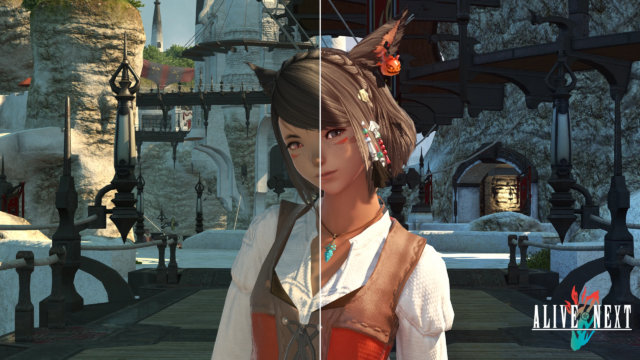
Face Defined DT is the Dawntrail-updated companion mod to Hair Defined and one of the most acclaimed character FFXIV mods ever released. Designed to elevate the vanilla faces of every playable race, gender, and clan in Final Fantasy XIV, it sharpens facial skin, lips, eyebrows, eyelashes, and makeup textures while preserving each character’s original identity and Square Enix’s art direction.
Key Features of Face Defined DT
- All Races, Genders & Clans Supported: Enhances Hyur, Miqo’te, Elezen, Lalafell, Roegadyn, Au Ra, Viera, and Hrothgar faces across Dawntrail 7.x.
- Vanilla-Faithful HD Overhaul: Upgrades low-resolution diffuse and normal maps so faces look crisp in cutscenes and GPose without turning characters into unrecognizable custom sculpts.
- Refined Makeup, Eyebrows & Facial Features: Cleans up pixelated lip lines, blush, eyeshadow, and brow textures across vanilla customization presets.
- Flexible Penumbra & TexTools Installation: Load dynamically in memory via Penumbra or import as a modpack using FFXIV TexTools.
Mod Specifications & Compatibility
| Specification | Details |
|---|---|
| Official Source | Face Defined on Nexus Mods |
| Compatibility | Final Fantasy XIV Dawntrail 7.x (All Playable Races & Clans) |
| Required Tool | Penumbra (via XIVLauncher & Dalamud) or FFXIV TexTools |
| Categories | Characters & Models and Textures |
How to Install Face Defined DT in FFXIV
- Click the Secure Download Mod button above to download the Face Defined DT archive.
- Launch Final Fantasy XIV through XIVLauncher and open Penumbra in-game with
/penumbra. - Navigate to Mods → Import Mod and select the downloaded
.pmpor.ttmp2file. - Enable Face Defined DT inside your active collection, configure any optional toggles, and redraw your character to apply the HD facial textures immediately.
New to Final Fantasy XIV modding? Follow our complete How to Mod FFXIV Guide, and check Are FFXIV Mods Allowed? for safe client-side modding best practices.
Best Mods to Pair With Face Defined DT
Combine Face Defined DT with these essential FFXIV visual upgrades for a cohesive HD look across your character and the world:
- Pair with Hrothgar and Viera Hats to unlock full headgear compatibility alongside upgraded facial textures.
- Upgrade Eorzea’s environments with Upscaled World Textures.
- Browse more FFXIV Character & Hair Mods, Apparel & Glamour Mods, and Visuals & ReShade Presets.
- Discover top-rated downloads in our Best FFXIV Mods collection.
Frequently Asked Questions
Will Face Defined DT conflict with custom face sculpts?
Face Defined DT targets vanilla facial textures. If you use a custom head sculpt on a specific character, place your sculpt at a higher priority in Penumbra or assign Face Defined DT to your default collection for NPCs and other players.
Does Face Defined DT impact game performance?
No noticeable FPS drop occurs on modern PCs. Because it updates facial texture maps client-side, it runs smoothly alongside Upscaled World Textures and custom shaders.
Leave a Reply